
MCP Server for the Creative Professionals: Free Tool Guide
Table of Contents
Introduction
No matter how proficient you’re with tons of creative programs or NLEs or motion graphics programs, if you’re not using MCP servers with your AI models/ agents, you’re missing out money out in the open.
It’s a no brainier, by now, that adopting an MCP server for the creative professionals’ bridges conversational AI interfaces with real production tools without requiring deep software engineering skills.
Instead of manually jumping across tabs, running repetitive scripts, or copying prompts between apps, designers, video editors, audio engineers, and content creators can trigger media processing, asset generation, stem separation, and layout tasks directly from AI assistants.
Notable free and open-source options include Kinocut (FFmpeg-based video editing and Remotion rendering), Soundbox (local audio generation and voice cloning), audiolla (self-hosted audio suite with 82 MCP tools) and Pumpp-MCP (image/video asset generation via fal.ai), alongside practical utilities like opency and cms-mcp-hub.
However, platform support is uneven: Claude offers the smoothest workflow, ChatGPT restricts custom connectors to Business/Enterprise/Edu workspaces, Gemini relies mainly on CLI and Enterprise, and DeepSeek requires a community bridge.
Why an MCP Server Matters for Creative Workflows?
Traditional AI chat is strong at brainstorming, copywriting, and structuring ideas, but weak at executing multi-step media tasks or respecting local project files.
Using MCP servers for the creative professionals can be an excellent way out in such cases. And there are plenty of free MCP servers for creators.
An MCP server for the creative professionals changes that dynamic by giving the AI controlled access to specialized capabilities while keeping you in charge of approval and final output.
For creative teams and solo practitioners, the practical benefits include:
- Fewer context switches: Draft concepts, refine prompts, and invoke editing or asset-generation tools inside one workspace.
- Repeatable production steps: Turn recurring tasks—such as silence removal, loudness normalization, stem isolation, or brand-aligned asset creation—into natural-language commands.
- Credential isolation: API keys and local execution paths can stay inside the server configuration rather than being pasted repeatedly into chat threads.
Architecture and the Three Core MCP Primitives – An essential knowhow for using MCP servers for the Creative Professionals
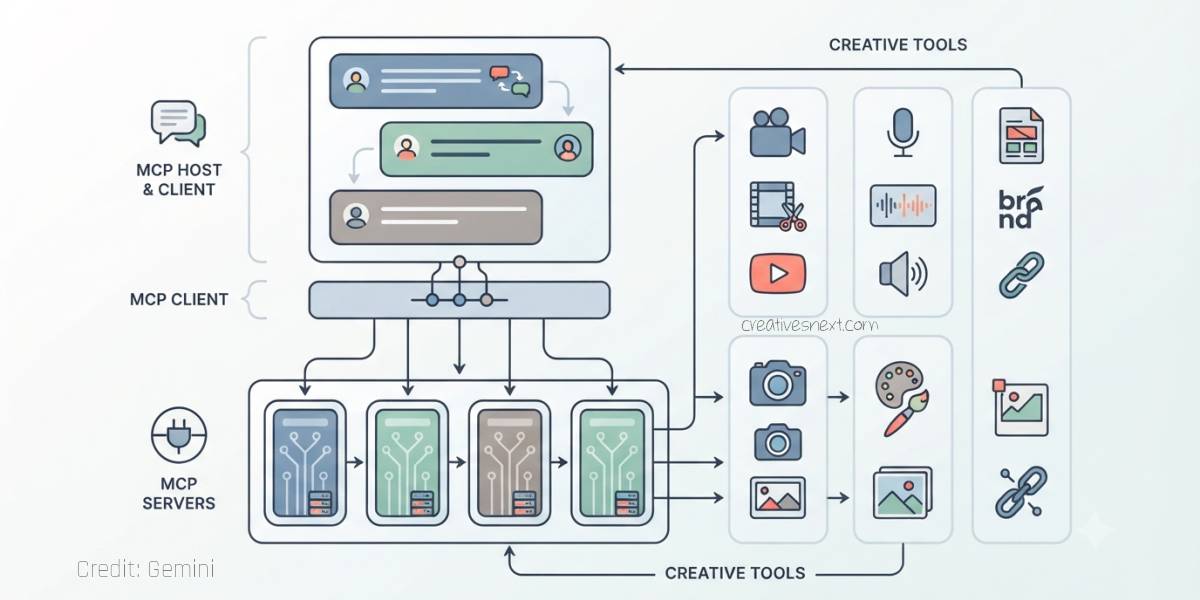
Model Context Protocol (MCP) follows a Host–Client–Server architecture:
- Host: The AI application you interact with (such as Claude Desktop, Gemini CLI, or an agent/API-enabled client).
- Client: The connector inside the host that maintains a session with an MCP server.
- Server: A local process or remote service that exposes capabilities to the model and executes requested actions.
According to the official specification, an MCP server exposes three core primitives:
- Tools (Executable Actions): Functions the model can invoke to perform real work—such as rendering an MP4, generating a PNG, analyzing audio loudness, or updating a project file. The model decides when to call a tool based on your instructions.
- Resources (Contextual Data): Reference files or data sources made available to the model, such as brand guidelines, design tokens/JSON exports, or media metadata. Hosts typically attach or expose resources via files or URIs.
- Prompts (Reusable Templates): Pre-structured workflows—often surfaced as slash commands—that guide the model through multi-step tasks like assembling a brand kit from a URL.
Security & Permission Note: MCP tools can execute code or modify local files. The specification requires explicit user consent before tool invocation, and third-party servers should be treated cautiously unless their source code is trustworthy and reviewed.
Free and Open-Source MCP Servers for Creative Professionals
We alll love freebies and there are quite some free MCP servers for the creators.
Below are free MCP servers for video and audio editing, visual generation, and content workflows worth evaluating:
A. Kinocut: MCP servers for Video Editing and Programmatic Rendering via FFmpeg
Kinocut is an open-source (Apache-2.0) MCP server, Python library, and CLI built around FFmpeg. It requires FFmpeg locally and executes core media operations on your machine.
- Core video operations: Build videos from image sequences, export frames, extract audio or thumbnails, generate previews, and create storyboards.
- AI-assisted editing tools: Auto-remove silence with configurable thresholds, generate transcripts via Whisper, detect scene changes, separate stems (vocals, drums, bass), upscale, auto-grade color, and position spatial audio.
- Remotion & effects: Scaffold and render Remotion (React-based video) compositions, synthesize basic waveforms and preset sound effects, and apply visual effects/transitions like vignette, film grain, scanlines, glow, and glitches.
- Setup: Install via pip install kinocut (or pip install “kinocut[ai]” for AI extras) and register with Claude Code using claude mcp add kinocut — uvx –from kinocut kino –mcp.
Subscribe & Stay Informed
Fill out the form below and get the latest update from our blog
B. Soundbox: Local Audio Generation, Voice Cloning, and Multi-Track Work – MCP servers for audio editing
Soundbox is a free, open-source (MIT) local alternative designed to run on your own hardware without cloud credits or accounts, exposing an MCP server (and HTTP API on port 17494) with 24 tools for clients like Claude Code and Cursor.
- Capabilities: Generate sound effects, ambience, songs/instrumentals from lyrics, speech synthesis, voice cloning, and stem splitting, backed by a multi-track timeline and local storage (~/.soundbox SQLite + WAV files).
- Model availability: Four models are verified and enabled by default, with 61 additional models toggleable depending on license terms and local GPU/compute capacity.
- Setup: Install via the Windows/macOS installer or client setup flow, then connect over HTTP ([http://127.0.0.1:17494/mcp](http://127.0.0.1:17494/mcp)).
C. audiolla: Self-Hosted Audio Processing Suite (82 MCP Tools) – A treasure trove of MCP servers for audio editing
audiolla packages 35 audio engines into a Docker container with zero cloud dependency for processing, exposing 82 MCP tools at /v1/mcp alongside a REST API.
- Capabilities: Stem separation (Demucs, UVR Roformer), reference mastering and effects chains, audio analysis (BPM, key, chords, LUFS, beats), speech cleanup/diarization (DeepFilterNet), editing/pitch/time adjustments, audio-to-MIDI conversion, and generative audio models on CUDA builds.
- Setup: Run locally via Docker (docker run –rm -it -p 127.0.0.1:8000:8000 psyb0t/audiolla:latest), choosing CPU or CUDA builds based on your hardware.
</Docker in a nutshell>
A slide show on Docker would be nice at this point for those who’re not that familiar. An understanding of Docker may help using MCP servers for the creative professionals.
Slide credit: Next Gen AI Systems – one of our partner sites that houses some AI powered protototypes for CNC machining systems.
D. Pumpp-MCP: Visual Asset Generation and Iterative Design – MCP servers for graphic design
Pumpp-MCP is an open-source MCP server connecting AI agents (such as Claude Desktop, Cursor, or Windsurf) to fal.ai for rapid visual generation and iteration.
- Capabilities: Translates agent requests into structured prompts across models like Flux, Stable Diffusion, and LTX-Video, reads local CSS/theme files to align colors with your UI, supports image-to-image refinements, and saves assets directly into your project directory while updating file references.
- Setup: Requires your own FAL_KEY environment variable and building/running via Node (npm install, npm run build && npm run start).
E. Additional Utilities for Content and Web Creators
- opency: A CLI utility (rather than a strict MCP server) focused on automated social media visuals, brand token checks, contrast/safe-area validation, copy review, and sourcing images via Openverse and Unsplash.
- cms-mcp-hub: Exposes MCP tools for CMS platforms—including WordPress (with Openverse image search), Shopify, and Webflow—helpful for creators managing multi-site publishing workflows.
Connecting MCP Servers to Claude, Gemini, ChatGPT, and DeepSeek
Knowing how to connect MCP servers to Claude, Gemini, ChatGPT, and DeepSeek saves time because each platform handles local tools, remote endpoints, and accounts differently.
Certainly a hurrah for using MCP servers for the creative professionals.
- Claude (Desktop & Web): Offers the most mature support. Claude Desktop configures local stdio servers via claude_desktop_config.json (great for Kinocut, Soundbox, and Pumpp-MCP). Claude Web supports remote connectors for eligible plans, which connect from Anthropic’s cloud over HTTPS (port 443)—meaning local-only localhost servers are not reachable directly by remote cloud connectors without a secure public tunnel/endpoint.
- Gemini: Consumer web/mobile Gemini does not provide custom MCP integration. Instead, Gemini CLI supports MCP servers via ~/.gemini/settings.json for terminal-driven workflows, while Gemini Enterprise supports MCP integration through Cloud Run deployments and Vertex AI Agent Builder.
- ChatGPT: Custom MCP connectors/apps are restricted to Business, Enterprise, and Edu workspaces, where workspace admins/owners enable Developer Mode, configure endpoints/auth, and publish approved connectors. Individual consumer accounts cannot freely add arbitrary custom MCP servers.
- DeepSeek: Does not offer a native MCP host app. However, community bridges such as openai-compatible-mcp connect MCP-capable hosts/agents to DeepSeek’s API (or compatible endpoints) using DEEPSEEK_API_KEY so DeepSeek can assist with reasoning or text/research subtasks inside an MCP-enabled workflow.
Understanding “Free”: Local Compute vs. Cloud APIs and Credits – Essential for using MCP servers for the Creative Professionals
A common trap when adopting open source MCP tools for creative workflows is assuming “free MCP server” means zero cost end-to-end. Keep three cost layers separate:
- Zero-cost open-source software: The MCP server code itself is free/open-source.
- Local hardware & storage cost: Running local audio/video models or heavy Docker containers uses your CPU, GPU/VRAM, RAM, and disk space. If your machine has limited VRAM or lacks specific GPU acceleration, heavy local generative models may be slow or impractical—making lightweight FFmpeg/CLI tasks a better starting point.
- External API / Cloud / Workspace cost: Servers like Pumpp-MCP (via fal.ai), DeepSeek API bridges, or Enterprise/Workspace platform features require their own API keys, usage credits, or subscription tiers.
Practical Roadmap to Get Started Safely – A quick check before using MCP servers for the creatives professionals
- Start small locally: If you use a local-capable client like Claude Desktop or Gemini CLI, start with a single practical task—such as trimming silence or normalizing loudness with Kinocut—and verify the output files yourself.
- Chain steps only after trust is earned: Once basic tool calls behave predictably, combine asset creation or audio cleanup into a repeatable sequence rather than automating destructive edits blindly.
- Audit permissions and paths: Always check which folders a server can read/write, keep backups of source media, and stick to well-maintained, transparent repositories.
Conclusion
At its heart, an MCP server for the creative professionals is not about turning artists, designers, or editors into programmers—it is about removing friction from your daily creative flow.
Whether you are trimming dead air from a video edit, cleaning up voiceovers, generating consistent visual assets, or organizing web content, using MCP server for the creative professionals lets your favorite AI assistant work directly alongside your production tools instead of trapping ideas inside a chat window.
The best part is that you do not need a massive budget to start experimenting. Open-source tools like Kinocut, Soundbox, and audiolla give you powerful local audio and video capabilities for free, while options like Pumpp-MCP connect smoothly when you are ready to bring cloud image generation into the mix.
Start small with one repetitive task on a platform you already use, keep an eye on file permissions, and gradually build a workflow that gives you more time for actual storytelling, design, and creative direction.